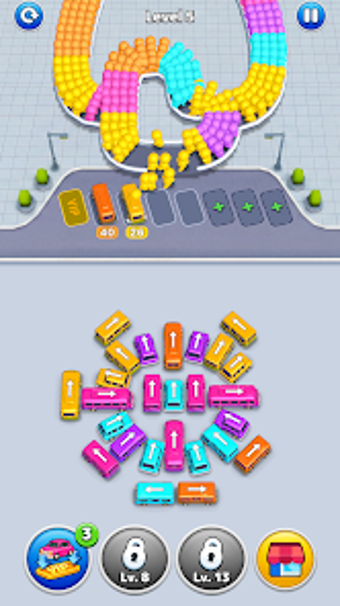
Bus Traffic Fever combines color-sorting with parking-jam puzzles
Bus Traffic Fever from GOODROIDInc. places you in charge of a busy bus terminal, asking you to organize vehicles so waiting riders get aboard. Players tap to move buses through a constrained station, resolving blockages and completing each level's objectives. The title emphasizes short, repeatable rounds, escalating challenge across stages, and lively presentation to help players learn quickly. It targets casual mobile users seeking brief strategic puzzles that reward spatial planning and quick decisions.
Hybrid puzzle design blends color-sorting with parking-jam tactics
The core loop pairs two identifiable systems: you match passengers to buses by color while managing vehicle flow through a tight terminal. Success depends on pairing same-color buses and passengers to clear areas, which creates alternating bursts of matching and traffic resolution. This mix of sorting and spatial juggling gives the game a simple objective that still produces layered decision-making as levels add new constraints.
Movement and planning reward short-term foresight
Limited placement options change each puzzle into a tactical problem. Narrow paths and constrained layouts force players to sequence moves instead of reacting randomly. Practical tactics include:
holding a slot open for an incoming match,
clearing one color to free a critical corridor,
prioritizing exits that unblock multiple buses.
These elements emphasize forward planning more than reflex alone.
Visuals and feedback keep outcomes readable under pressure
The game uses vibrant 3D visuals and smooth animations to make sets and departures obvious at a glance. Satisfying visual cues mark successful matches and departures, and community notes highlight polished performance and a clean visual style on Android devices. Those presentation choices reduce ambiguity during crowded moments, so players can identify which moves will open or close critical paths.
Progression focuses on escalating constraints and replay value
Levels introduce additional colors, tighter spaces, and larger crowds to raise difficulty, which pushes players to refine patterns rather than memorize single solutions. Numerous level configurations create variety across runs, and the design encourages repeating stages to improve efficiency. That structure supports short sessions while offering increasing challenge for players who pursue higher-level optimization and score improvement.
Well suited to quick puzzle sessions; not built for long-form campaigns
Bus Traffic Fever is a compact choice for casual mobile players who enjoy spatial logic and incremental challenge, because its stages emphasize brief rounds and escalating constraints. Players seeking deep narratives or extended progression systems may find the scope limited. For anyone who prefers bite-sized, tactical puzzles on Android, the game provides a focused, repeatable experience that rewards planning and refinement.
Pros
Hybrid color-sorting plus parking-jam design creates layered puzzles
Clear animations and visual cues make results easy to read
Progressive levels add new colors and tighter layouts
Numerous level configurations support repeat play
Cons
Level scope favors short runs over long campaigns
Difficulty ramps with added colors may overwhelm new players
Tight layouts increase gridlock risk for unplanned moves
Loading…
About permissions
Before downloading, you can take a quick look at the permissions this app may request on your device. App permissions allow certain features to work properly, such as accessing your camera to take photos, your location for maps, or your storage to save files.
In this section, you’ll find a clear and simple overview of the types of permissions the app uses, grouped by their level of sensitivity, along with a visual breakdown to help you understand them at a glance. This way, you can see how the app interacts with your device and decide to download with confidence.
Permissions types
Standard
75%
Sensitive
25%
Permissions distribution
Privacy
50%
Data collected
25%
Data shared
25%
Data safety info
Privacy
4 permissions
Permissions that allow the app to access personal or sensitive information stored on your device, such as location, contacts, camera, or microphone.
android.permission.READ_PHONE_STATE
Sensitive
android.permission.VIBRATE
Standard
android.permission.WAKE_LOCK
Standard
android.permission.FOREGROUND_SERVICE
Standard
Data collected
2 permissions
Information the app may gather from your device or usage activity to enable features, personalize content, and improve overall performance.
android.permission.ACCESS_NETWORK_STATE
Standard
android.permission.ACCESS_WIFI_STATE
Standard
Data shared
2 permissions
Information that may be shared with trusted third parties to provide services, support app functionality, or deliver relevant content.
android.permission.INTERNET
Standard
android.permission.POST_NOTIFICATIONS
Sensitive
This report summarises the permissions declared by the app at the time of scanning and groups them into Privacy, Data collected and Data shared. A declared permission shows what the app can access, it does not necessarily mean personal data is collected or transmitted. For full details check the app’s privacy policy and the developer’s clarifications shown below. Softonic generates this report automatically from the package metadata; it is informational and not a substitute for a full security or privacy audit.
Laws concerning the use of this software vary from country to country. We do not encourage or condone the use of this program if it is in violation of these laws. Softonic may receive a referral fee if you click or buy any of the products featured here.